Slice Registration Panel
Options and controls for automatically and manually aligning image slices are available in the Slice Registration panel, shown below. Right-click the required dataset in the Data Properties and Settings panel and then choose Dataset Slice Registration in the pop-up menu to open the panel.
Slice Registration panel

A. Registration and compensation methods B. Settings C. Registration options D. Transformation options
 Registration and Compensation Methods
You can select a matching process for aligning slices automatically, a compensation method to correct unwanted drift, or choose to work in manual mode in the Registration method drop-down menu.
Registration method drop-down menu

The available registration and compensation methods are described in the following table.
|
|
Description |
|---|---|
|
Enhanced Correlation Coeff. |
The Enhanced Correlation Coefficient (ECC) registration method implements an area-based alignment that builds on intensity similarities. Refer to Enhanced Correlation Coefficient Settings and the following for more information: Parametric image alignment using enhanced correlation coefficient maximization, Georgios D. Evangelidis and Emmanouil Z. Psarakis. Pattern Analysis and Machine Intelligence, IEEE Transactions on, 30(10):1858–1865, 2008. |
|
Feature Based |
Matches features between image slices by detecting corners, which are regions in the image with large variations in intensity in all directions (see Feature Base Settings for more information about feature based matching). |
|
Linear Displacement Compensator |
In some cases, you may notice that an unwanted drift has occurred after automatically aligning an image stack. For example, after applying the mutual information algorithm. To remedy such occurrences, Dragonfly provides the option to apply a linear displacement compensation after an automatic registration has been applied to an image stack. The results of registration before (on the left) and after (on the right) linear displacement compensation are shown below.
NOTE The applied compensation factor is selectable with the Compensation Factor slider. |
|
Manual |
Lets you access tools for manually translating and rotating image slices in the workspace (see Aligning Slices Manually). |
|
Mutual Info |
Mutual information is a basic concept from information theory that can be applied in the context of image registration to measure the amount of information that one image contains about another. Image registration by maximization of mutual information considers all voxels in the images to be registered to estimate the statistical dependence between corresponding voxel intensities. The registration criteria postulates that mutual information is maximal when the images are correctly aligned. You should note that the criterion is histogram based rather than intensity based, does not impose limiting assumptions on the specific nature of the relationship between corresponding voxel intensities, and is shading independent. Refer to Mutual Info and SSD Settings and the following for more information: Medical Image Registration Using Mutual Information, Frederik Maes, Dirk Maes, and Paul Suetens. Proceedings of the IEEE, Vol. 91, No. 10, 2003. |
|
Optical Flow |
Optical flow is the pattern of apparent motion of objects, surfaces, and edges in a visual scene caused by the relative motion between an observer and the scene. When applied to registration, the optical flow method tries to calculate the motion between two images at times t and t+\Delta t at every voxel position. This differential method, which is based on local Taylor series approximations of the image signal, uses partial derivatives with respect to the spatial and temporal coordinates. Refer to Optical Flow Settings and the following for more information: Determining Optical Flow, Berthold K.P. Horn and Brian G. Schunck. MIT, Artificial Intelligence Laboratory, April 1980. Relaxing the Brightness Constancy Assumption in Computing Optical Flow, Michael A. Gennert and Shahriar Negahdaripour. MIT, Artificial Intelligence Laboratory, June 1987. On Variable Brightness Optical Flow for Tagged MRI, Sandeep N. Gupta and Jerry L. Prince. Information Processing in Medical Imaging, 1995. |
|
SSD |
In the SSD (sum of squared differences) matching process, differences are squared and aggregated within a square window and later optimized by a winner-take-all strategy. This measure has a higher computational complexity compared to sum of absolute differences (SAD) algorithms as it involves numerous multiplication operations, but can produce superior results. Refer to Mutual Info and SSD Settings for more information. |
|
Template Matching |
Provides a method for searching for and finding the location of a template image in the larger images within the 3D image stack. This registration method simply slides the template image over the input image (as in 2D convolution) and compares the template and patch of input image under the template image (see Template Matching Settings). NOTE Template matching may perform poorly in cases in which rotations, repetitive patterns, or large contrast changes are present in the images within the stack. |
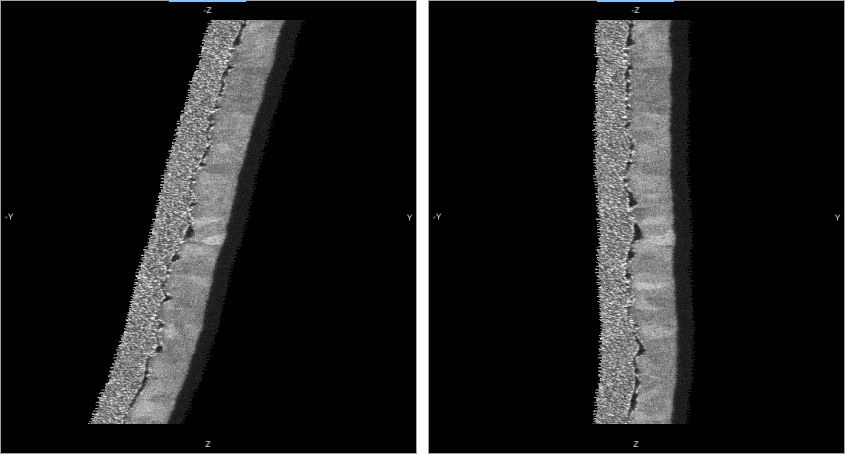
Image registration algorithms can be classified according to the transformation models they use to relate the target image space to the reference image space. The first category of transformation models allows for linear transformations, which include rotation and translation. Linear transformations are global in nature and cannot model local geometric differences between images. The second category of transformations allow for elastic or non-rigid transformations. These transformations are capable of locally warping the target image to align the reference image.
Registration Method Settings
Settings for the selected registration or compensation method are available in the Settings box.
Enhanced Correlation Coefficient Settings
The setting for the Enhanced Correlation Coefficient (ECC) registration method let you choose the type of motion allowed — Translation or Euclidean — as well as the number of iterations and the threshold of the correlation coefficient between two iterations.
You should note that the ECC registration method is generally not recommended for coarse adjustments or for cases in which large drifts are noted. However, this method usually produces good results for refining alignments.
ECC settings

| Description | |
|---|---|
|
Motion |
Lets you specify the type of motion that will be allowed to find the geometric transform between two images in terms of the ECC criterion. Translation… Sets a translational transformation as the motion model. Euclidean… Sets a Euclidean (rigid) transformation as the motion model. |
|
Number of Iterations |
Determines the maximum number of iterations that will be run when the Apply button is clicked. |
|
Epsilon |
Defines the threshold of the increment in the correlation coefficient between two iterations. In general, increasing Epsilon will usually improve poor matches. |
Feature Base Settings
The settings for the Feature Base registration method let you select a feature detector, as well as choose the type of motion allowed and the maximum number of iterations. Previews are available to help you evaluate the effectiveness and accuracy of feature-based matching for your alignment requirements. The Feature Base registration method often provides a good initial alignment that can be refined with an additional alignment using another method, such as Enhanced Correlation Coefficient.
Feature Base settings

| Description | |
|---|---|
|
Feature Detector |
Lets you select the keypoint detector and extractor that will be applied to detect stable keypoints and select the strongest features. The main differences that you may note between feature detectors is the total number of features detected, rather than the accuracy of feature detection. ORB… Implements the ORB (oriented BRIEF) keypoint detector and descriptor extractor described in Orb: an efficient alternative to sift or surf, Ethan Rublee, Vincent Rabaud, Kurt Konolige, and Gary Bradski. In Computer Vision (ICCV), 2011 IEEE International Conference on, pages 2564–2571. IEEE, 2011. BRISK… Implements the BRISK keypoint detector and descriptor extractor, described in Brisk: Binary robust invariant scalable keypoints, Stefan Leutenegger, Margarita Chli, and Roland Yves Siegwart. In Computer Vision (ICCV), 2011 IEEE International Conference on, pages 2548–2555. IEEE, 2011. AKAZE… Implements the AKAZE keypoint detector and descriptor extractor, described in Fast explicit diffusion for accelerated features in nonlinear scale spaces, Pablo F. Alcantarilla, Jesús Nuevo, and Adrien Bartoli. Trans. Pattern Anal. Machine Intell, 34(7):1281–1298, 2011. |
|
Motion |
Lets you specify the type of motion(s) that will be allowed to find the geometric transform between two images in terms of the Feature Base criterion. Translation… Sets a translational transformation as the motion model. Rotation… Sets a rotational transformation as the motion model. NOTE Do not select Rotation unless you are sure that the dataset includes a rotational motion. |
|
Epsilon |
Defines the threshold of the feature base correlation. In general, reducing Epsilon may be required in cases in which mismatched features are noted when you preview features. |
|
Number of Iterations |
Determines the maximum number of iterations that will be run when the Apply button is clicked. |
|
Preview Feature |
The preview for Feature Base comparisons, shown below, stacks two images horizontally and draws lines from the first image (the currently displayed slice in the workspace) to the next slice in the image stack and shows the best matches for the total number of features requested for the preview. In cases in which you notice mismatches, you may have to reduce Epsilon. You should also note that working with selected ranges can also help optimize your results.
Number of Features… Lets you specify the maximum number of corners to return for the preview. If there are more corners than requested, the strongest matches will be returned. |
 Mutual Info and SSD Settings
The basic settings for the Mutual Info and SSD registration method let you specify the maximum translation — Small, Medium, or Large — that will be applied to align slices in the selected dataset. You should note that in this mode image resolution is voxel-based and rotation is not allowed. If required, you can rotate image slices in manual mode (see Aligning Slices Manually) or choose to work with the advanced settings.
Basic settings for Mutual Info and SSD

| Description | |
|---|---|
|
Use advanced settings |
Provides access to the advanced settings, which are only available for Dragonfly Pro. Contact Object Research Systems for information about the availability of Dragonfly Pro. |
|
Maximum translation |
Determines the maximum translation that will be allowed between two slices as follows: Small… Limited to 0.5% of the size of the image. Medium… Limited to 2.5% of the size of the image. Large… Limited to 5.0% of the size of the image. |
If the general translation options available in Basic mode are not adequate for registering your datasets, you can use the advanced settings. In this mode, image resolution is sub-voxel based and rotations can be allowed. In addition, you can define the initial steps and smallest steps for allowed transformations.
The following advanced settings are available if Mutual Info or SSD is selected as the matching process.
Advanced settings for Mutual Info and SSD

The Advanced settings are only available for Dragonfly Pro. Contact Object Research Systems for information about the availability of Dragonfly Pro.
| Description | |
|---|---|
|
Use translation |
If checked, translations in the X and Y directions will be allowed. You can define the Initial step and Smallest step as follows: Initial step… Defined as a percentage of the length of an image axis, the Initial step is the first translation that will be applied and tested by the algorithm. For reference, the percentage is also indicated as a length measurement. Smallest step… Defined as a percentage of the length of an image axis, the Smallest step is the minimum distance that will be tested by the algorithm. You can increase the smallest step if accuracy is not critical, and decrease the smallest step as accuracy demands increase. |
|
Use rotation |
If this option is checked, rotations will be considered during the alignment process. By default this option is unchecked. You can define the Initial step and Smallest step as follows: Initial step… Defined in degrees, the Initial step is the first rotation that will be applied and tested by the algorithm. Smallest step… Defined in degrees, the Smallest step is the minimum rotation that will be tested by the algorithm. You can increase the smallest step if accuracy is not critical, and decrease the smallest step as accuracy demands increase. |
|
Register relatively to the current slice |
Lets you set a single slice, the current slice, as the reference to which all other slices in the image stack will be registered. NOTE Selecting this option may help avoid introducing linear drift during the registration process. |
Optical Flow Settings
The basic settings for the Optical Flow registration method let you specify the maximum translation — Small, Medium, or Large — that will be applied to align slices in the selected dataset. You should note that in this mode image resolution is voxel-based and rotation is not allowed. If required, you can rotate image slices in manual mode (see Aligning Slices Manually) or choose to work with the advanced settings.
Basic settings for Optical Flow
| Description | |
|---|---|
|
Use advanced settings |
Provides access to the advanced settings, which are only available for Dragonfly Pro. Contact Object Research Systems for information about the availability of Dragonfly Pro. |
|
Smallest translation step |
You can select the step at which point iteration stops as follows: Small… 1*min(spacingX,spacingY). Medium… 5*min(spacingX,spacingY). Large… 25*min(spacingX,spacingY). |
If the general translation options available in Basic mode are not adequate for registering your datasets, you can use the advanced settings. In this mode, image resolution is sub-voxel based and rotations can be allowed. In addition, you can define the smallest steps for allowed transformations.
The following advanced settings are available if Optical Flow is selected as the matching process.
Advanced settings for Optical Flow

The Advanced settings are only available for Dragonfly Pro. Contact Object Research Systems for information about the availability of Dragonfly Pro.
| Description | |
|---|---|
|
Use translation |
If this option is checked, translations in the X and Y directions will be allowed. You can define the Smallest step as a percentage of the total length of an axis. Smallest step… The step at which point iteration stops. You can increase the smallest step if accuracy is not critical, and decrease the smallest step as accuracy demands increase. |
|
Use rotation |
If this option is checked, rotations will be considered during the alignment process. By default this option is unchecked. You can define the Smallest step in degrees as follows: Smallest step… The step at which point iteration stops. You can increase the smallest step if accuracy is not critical, and decrease the smallest step as accuracy demands increase. |
|
Gaussian pyramid level |
Determines the level of coarse-to-fine optical flow estimation during iterative refinements. |
|
Use brightness correction |
The Optical Flow registration type is sensitive to brightness changes between image slices and assumes that total intensity is the same throughout the image stack. This option normalizes brightness between two image slices. Using brightness correction is recommended for most applications. |
|
Refine registration by mutual info |
If selected, the results of the initial registration will be refined by maximizing mutual information between image slices. You should note that mutual information is maximal when images are correctly aligned. |
Template Matching Settings
Template Matching is a method for searching and finding the location of a template image, or sub image, in a larger image. It simply slides the template image over the input image (as in 2D convolution), determines the best location for the template, and applies the required translation to match the slices. Several template matching methods are implemented in Dragonfly.
Template Matching is one of the fastest methods for aligning slices in an image stack. However, you should note that template matching may perform poorly in cases in which rotations, repetitive patterns, or large contrast changes are present in the images within the stack. You should also be aware that template matching might not be appropriate if features increase or decrease in size over a number of slices.
Template Matching settings

| Description | |
|---|---|
|
Template Matching Method |
Lets you select a template matching method, as follows. Correlation Coefficient and Correlation Coefficient Normed… The correlation coefficient between images is one of the most widely used similarity measures for aligning images. However, this measure can be sensitive to the presence of "outliers" that appear in one image but not in others. This limitation can lead to biased registrations. Cross-Correlation and Cross-Correlation Normed… Is a measure of similarity as a function of the displacement of one relative to the other. Cross-correlation is similar in nature to the convolution of two functions. Square Difference and Square Difference Normed… Is a measure of variation or deviation as represented by the squares of the variations from the mean. The performance of this method is done by making comparisons based on the value of the correlation coefficient that is produced from different template images. Refer to https://docs.opencv.org/3.2.0/df/dfb/group__imgproc__object.html#ga3a7850640f1fe1f58fe91a2d7583695d for more information about the available template matching modes. |
|
Preview Template Matching |
The preview for template matching returns a grayscale image, the matching result, in which each pixel denotes how much the neighborhood of that pixel matches with the template. The matching result, shown below, is created by moving the template across the whole image. You should note that using larger templates can reduce repetitive pattern mismatches and is generally faster than smaller ones, as the search space will decrease as the template size increases. You should also note that the selected template is updated on every slice.
NOTE The maximum intensity values (white) returned for the correlation and cross-correlation template matching methods indicate the best matches, while low intensity values (black) returned for the square difference matching methods indicate the best matches. |
 Registration Options
The options available here let you apply use a selection box as a mask to indicate valid values in the input image, select a slice range, and apply the registration. Other options let you view the registration history, undo a registration, and save a registration template.
Registration options

|
|
Description |
|---|---|
|
Use selection box |
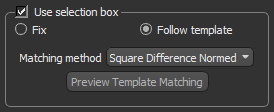
If selected, calculations for the required transformations will be constrained to the 2D region defined by the selection box (X and Y axes only). Two options are available for the selection box — Fixed and Follow template. Fixed… If selected, the selection box will not move during the registration process. Follow template… If selected, the selection box will search for and find the location of the template image in the larger images in the stack. You can select the matching method that will be used to compare and match the template with each input image (see Template Matching Settings).
The preview returns a grayscale image, the matching result, in which each pixel denotes how much the neighborhood of that pixel matches with template.
NOTE You should always set the template on the first slice in a selected range. |
|
Use slice range |
If selected, transformation computations will be calculated only for the selected slice range. For example, if you decide to use Template Matching you may need to limit the number of slices to those that include the template image you want to follow. You should note that any transformation applied to the last slice in the range will also be applied to the remaining slices in the image stack. You should always set the template on the first slice in a selected range. |
|
Apply |
Applies the selected registration or compensation method, at their current settings, to the dataset. |
|
Undo |
Undoes the current registration. |
|
History |
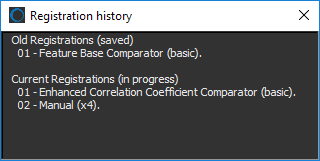
Opens the Registration history dialog, in which you can see all of the registration steps that were applied to the current dataset. You can reset the registration to any previously applied step in the Registration(s) applied drop-down menu.
|
|
Registration(s) applied |
Indicates the current registration applied. and provides the option to reset the registration to any previously applied step.
|
|
Registration group |
The options available here let you save transformations in a template file, as well as load a saved transformation. Save… Saves the current transformation in a template file (see Saving and Loading Transformation Templates). Load… Loads a saved transformation template file (see Saving and Loading Transformation Templates). Delete Saved… Opens the Delete Template dialog, in which you can delete saved transformation templates. |
 Transformation Options
Transformations can be implemented by either one of two mechanisms — at the input so that the original image data is transformed, or at the output so that a new dataset is created and the original image remains unmodified. Transformation can also be applied to other available datasets.
|
|
Description |
|---|---|
|
Transform current dataset |
If selected, transformations will be applied to the current dataset when you click OK. |
|
Create new dataset |
If selected, a new dataset with the applied transformations will be created when you click OK. |
|
Select other dataset(s) to transform |
Lets you apply the current registration to another available dataset. |